MusicXML exporteren
Met vsa musicxml zet je VSA-notatie om naar .mxl (gecomprimeerd MusicXML, standaard)
of naar platte .musicxml. Open het in MuseScore of speel af op
Coria.
Deze pagina is de workflow-uitleg (profielen, Coria, mappen, opties). Voor de
volledige CLI-syntax, alle argumenten en foutgevallen: zie de man-pagina
vsa musicxml.
Snel starten
Eén bestand (docs-fixture: tropaar zondag toon 3):
cd /d C:\Git\orthodox-ronl\VSA-tooling
vsa musicxml examples\docs-walkthroughs\coria-oefenlink\oefenmelodie.vsa generated\mxl\oefenmelodie.mxl
Zonder extensie krijg je ook .mxl:
vsa musicxml examples\docs-walkthroughs\coria-oefenlink\oefenmelodie.vsa generated\mxl\oefenmelodie
Platte MusicXML (bijv. voor MuseScore-bewerking):
vsa musicxml examples\docs-walkthroughs\coria-oefenlink\oefenmelodie.vsa generated\mxl\oefenmelodie.musicxml
Of expliciet:
vsa musicxml examples\docs-walkthroughs\coria-oefenlink\oefenmelodie.vsa generated\mxl\oefenmelodie --format musicxml
Bij map-export (standaard .mxl per .vsa-bestand):
vsa musicxml content-source\praktijk output\mxl
Oefenen in Coria
Walkthrough (lokale fixture)
Bronmap: examples\docs-walkthroughs\coria-oefenlink\
(onderwerp: tropaar zondag toon 3 / koormap Groningen).
oefenlink.md:
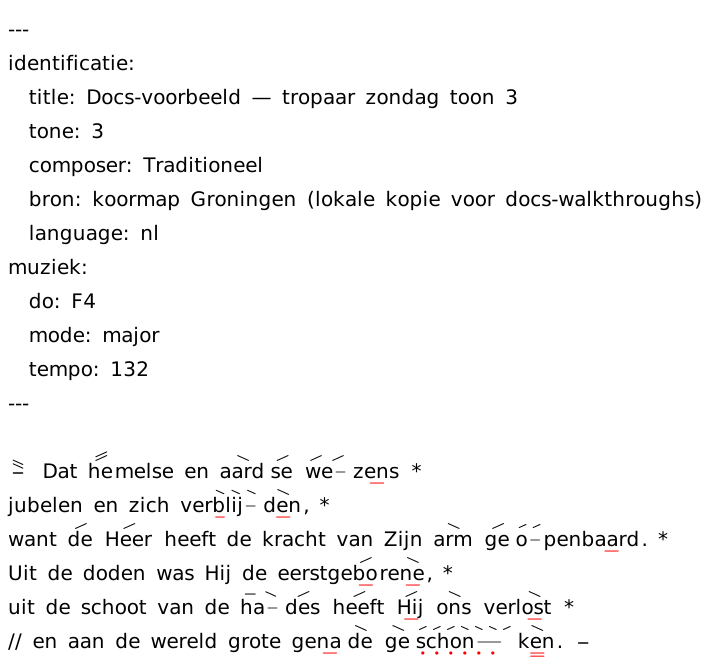
:::include svg "oefenmelodie.vsa" alt="Tropaar zondag toon 3 (docs-voorbeeld)" scale="85%":::

:::coria "oefenmelodie.vsa" label="Oefenen in Coria":::
Naast de .vsa ligt oefenmelodie.coria.html (docs-placeholder), zodat
mode="auto" de HTML-variant kiest.
cd /d C:\Git\orthodox-ronl\VSA-tooling
vsa build-markdown examples\docs-walkthroughs\coria-oefenlink generated\docs-walkthrough-coria\content generated\docs-walkthrough-coria\static\vsa
Uitgevoerde Markdown bevat o.a.:
<img class="vsa-notation" src="/vsa/oefenlink-block-1.svg" alt="Tropaar zondag toon 3 (docs-voorbeeld)" …>
{{< coria-html src="/coria/oefenmelodie.html" label="Oefenen in Coria" >}}
De build kopieert oefenmelodie.coria.html naar
generated\…\static\coria\oefenmelodie.html. Preview van dezelfde melodie
als SVG:
In content-source: :::coria (aanbevolen)
Zelfde padregels als :::include. Bron is een vsa-bestand of een native
.mxl / .musicxml:
:::include svg "oefenmelodie.vsa" alt="Tropaar" scale="85%":::
:::coria "oefenmelodie.vsa" label="Oefenen in Coria":::
:::include coria "corpus/T4-11-nicolaas-van-myra.mxl" label="Oefenen in Coria":::
:::include mxl "corpus/T4-11-nicolaas-van-myra.mxl" label="Download MusicXML":::
Bij vsa build-markdown:
- Pad oplossen t.o.v. het
.md-bestand. - Als
{stem}.coria.htmlnaast de bron staat → link naar Coria-HTML (partij al gekozen). - Anders → MusicXML via
play_from_url: .vsa→/vsa/mxl/…/{stem}.mxl(afgeleide).mxl/.musicxml→/mxl/…(bestand zelf; build kopieert naarstatic/mxl/)
Optioneel Coria-HTML naast de bron (handmatig uit Coria):
coria-oefenlink/oefenmelodie.vsa
coria-oefenlink/oefenmelodie.coria.html
Build kopieert .coria.html naar static/coria/…/oefenmelodie.html.
Parameters:
| Parameter | Betekenis |
|---|---|
label="…" |
Linktekst (default: Oefenen in Coria) |
mode="html" |
Forceer Coria-HTML (fout als .coria.html ontbreekt) |
mode="mxl" |
Forceer MXL deep-link |
mode="auto" |
HTML indien aanwezig, anders MXL (default) |
Volledige parameterdocumentatie:
exporttype coria
(exporttype coria).
Hugo-shortcodes (edge cases)
De build emitteert {{< coria-html >}} of {{< coria >}} met het juiste pad.
Handmatig shortcodes schrijven is niet nodig in content-source.
In Python:
from vsa.coria import coria_play_url
from vsa.content_assets import resolve_asset
Wat kun je instellen?
De meeste instellingen staan in YAML-frontmatter bovenaan je .vsa-bestand
(zie ook YAML frontmatter in .vsa-bestanden).
Muziek
| Instelling | Wat het doet | Standaard |
|---|---|---|
do |
Grondtoon (bijv. F4) |
F4 |
mode |
major of minor |
major |
tempo |
Tempo in BPM voor afspelen (metronoom onzichtbaar op blad/PDF; alleen gezet als je het expliciet opgeeft) | 130 |
meter |
Maatsoort, bijv. 4/4 (optioneel) |
— |
reciting-mode |
Ongescopte tekst: quarters (één kwartnoot per woord) of whole (één hele noot bij ≥4 woorden) |
quarters |
musicxml-profile |
playback (Coria/MuseScore) of engraving (partituurbewerking) |
playback |
Identificatie (titels in het bestand)
| Instelling | Voorbeeld |
|---|---|
title |
Tropaar van de zondag, toon 3 |
composer |
Traditioneel |
language |
nl (alleen relevant bij profiel engraving) |
tone |
Liturgische toon, bijv. 3 |
Afspelen (profiel playback)
Canonieke klank is piano op elke partij (keyboard.piano.grand).
Voor SATB-.mxl uit .mvsa staat dat vast in de export (checklist M8).
Bij eenstemmig .vsa is piano de default. Coria heeft daarnaast een eigen
geluidskeuze in de speler (los van dit veld in het bestand).
| Instelling | Standaard | Tip |
|---|---|---|
part-name |
Vocal |
Naam van de partij |
midi-sound |
keyboard.piano.grand |
Canonieke piano; niet wijzigen voor Coria |
midi-channel |
1 |
MIDI-kanaal |
midi-program |
1 |
Acoustic Grand Piano (GM) |
Typografie (profiel engraving)
Lettertypes en groottes voor MuseScore. Alleen actief als je
musicxml-profile: engraving kiest:
typografie:
  lyric-font: Source Sans 3
  lyric-size: "13"
  word-font: Source Sans 3
  word-size: "12"
Voorbeeld frontmatter
---
muziek:
  do: F4
  mode: major
  tempo: 132
  musicxml-profile: playback
  midi-sound: keyboard.piano.grand
identificatie:
  title: Tropaar van de zondag, toon 3
  composer: Traditioneel
  tone: "3"
---
[:] Ter{/&/wijl_&_} ...
Twee exportprofielen
Standaard gebruikt vsa musicxml het playback-profiel. Dat is bedoeld
voor afspelen en import zonder handmatige opschoning — onder andere Coria en
MuseScore na roundtrip.
SVG is het blad: strofenummers en refreincues blijven zichtbaar. Playback-MXL
is alleen zang. Scopeloze segmenten tussen hoogte-markeringen (blad-aanwijzing
zoals 2. of Door …) krijgen één hele-nootrust (4 tellen) zonder lyrics —
een pauze vergelijkbaar met een dubbele maatstreep in MSCZ. Extra
debug-hoogte-markeringen blijven checkpoints en knippen de zang niet af; zie
Ongescopte tekst.
Kies engraving als je de partituur verder wilt bewerken en expliciete
maatstrepen, typografie-hints of gedetailleerde melisma-lijnen nodig hebt:
muziek:
  musicxml-profile: engraving
Of via de commandoregel:
vsa musicxml lied.vsa lied.mxl --musicxml-profile engraving
Tips
- Koorleden zonder extra klikken? Plaats
{stem}.coria.htmlnaast de bron (.vsaof native MusicXML) en gebruik:::coria "bestand.vsa":::of:::include coria "bestand.mxl":::in content-source. - Coria laadt het
.mxlniet? Controleer of je niet per ongelukengravinghebt gekozen; gebruikplayback(de default). Op een website moet het.mxl-bestand via HTTPS bereikbaar zijn. - Coria:
translation failed? Bekende oorzaken: in<identification><source>én<encoding>samen (M17), of<miscellaneous>vóór<encoding>(M19);<notehead>(o.a.none); en binnen<note>een foute kindvolgorde —<lyric>vóór<staff>, of<dot>ná<accidental>(M20). Hetplayback-pad /mxl normalizeverwijdert<source>, zetencodingvóórmiscellaneous, striptnotehead, en herschikt note-kinderen; bronvermelding hoort inmiscellaneous-field name="bron".mxl validatefaalt op M20 vóór publicatie. - Tempo staat er niet in? Zet
tempoexpliciet in frontmatter; anders wordt geen tempo-markering geëxporteerd. - Lettergrepen in reciteertoon: gebruik een koppelteken in het woord
(
mel-se→ twee kwartnoten met syllabic begin/eind). - Meer detail? Zie MusicXML-export en MusicXML-exportprofielen.